Cookie Monster 3.47
Updated on 10 Aug 2011
By Anthony Buckner
By Anthony Buckner
Specifications
License:
Shareware (Free to try)
Updated:
Downloads:
839
Platform:
Windows XP, 2000, NT
Publisher:
AMPsoft(more)
Website:
User Reviews:
Other versions:
Do you like
Cookie Monster?
Cookie Monster?
FindMySoft Editor's Review
Cookie Monster – Easily Manage Browser Cookies
Cookies, just in case you’re not up to spec on your IT lingo, are small pieces of text that your web browser stores on your computer. It does this so it can recall things like your browsing preferences, login data, profile information, the identifier of a sever-based session, and so on. As a matter of fact, certain sites can track you when you visit them via browser cookies. For privacy reasons, you might want to remove the cookies your browser stores. And this is where the Cookie Monster comes in.
No, I am not talking about Cookie Monster the Sesame Street character known for his voracious appetite and his “Me want cookie!” catchphrase. I am talking about a different cookie monster here, a software application that will help you manage the cookies stored by the most popular browsers out there – such as Microsoft’s Internet Explorer, Mozilla’s Firefox, Google’s Chrome and Opera Software’s Opera browser.
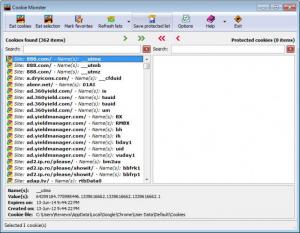
With the Cookie Monster software application you can delete all the cookies your browser stored, or you can selectively delete cookies. You could for example keep the cookies for the sites you visit most, and remove all the clutter. It is all as simple as going through a few mouse clicks. Cookie Monster can even detect cookies from sites included in your favorites and/or bookmarks – then it can delete all cookies, except the ones linked to the aforementioned sites.
Speaking of simplicity, you are going to love how easy to use the UI of this cookie manager is. The UI (user interface) is so simple to use that even novice users will get the hang of things in no time at all. I especially liked the “Eat Cookies” button.
Cookie Monster is freeware. After downloading the application, you can use it free of charge on your Windows-powered computer. Since you don’t have to install a thing (just run the Cookie Monster executable) you could put Cookie Monster on an USB stick and take it with you.
Pros
Cons
No, I am not talking about Cookie Monster the Sesame Street character known for his voracious appetite and his “Me want cookie!” catchphrase. I am talking about a different cookie monster here, a software application that will help you manage the cookies stored by the most popular browsers out there – such as Microsoft’s Internet Explorer, Mozilla’s Firefox, Google’s Chrome and Opera Software’s Opera browser.
With the Cookie Monster software application you can delete all the cookies your browser stored, or you can selectively delete cookies. You could for example keep the cookies for the sites you visit most, and remove all the clutter. It is all as simple as going through a few mouse clicks. Cookie Monster can even detect cookies from sites included in your favorites and/or bookmarks – then it can delete all cookies, except the ones linked to the aforementioned sites.
Speaking of simplicity, you are going to love how easy to use the UI of this cookie manager is. The UI (user interface) is so simple to use that even novice users will get the hang of things in no time at all. I especially liked the “Eat Cookies” button.
Cookie Monster is freeware. After downloading the application, you can use it free of charge on your Windows-powered computer. Since you don’t have to install a thing (just run the Cookie Monster executable) you could put Cookie Monster on an USB stick and take it with you.
Pros
- You can manage/delete cookies stored by all your browsers – at once. Say you have IE and Firefox. Traditionaly you would have to fire up IE and delete the cookies from within the browser, then launch Firefox and delete the cookies the browser stored. With Cookie Monster you can do this at once, with a simple mouse click.
- Very easy to use
- Does not require installation
- Free of charge
- Interesting sound effects
Cons
- If you only have 1 browser installed on your system, you could delete the cookies it stored without the use of 3rd party applications such as Cookie Monster.
System Requirements
No Special Requirements
Do you like Cookie Monster
Advertising
Popular News
The “Who Touched my Phone” app will show you who snooped on your iPhone while you were away.
The Suspend Background Tabs add-on will prevent background tabs from running periodical actions, thus improving the browser’s performance and preventing unnecessary CPU load.
Cookie Monster Awards
Cookie Monster Editor's Review Rating
Cookie Monster has been reviewed by George Norman on
22 Feb 2010. Based on the user interface, features and complexity, Findmysoft has rated
Cookie Monster
5
out of 5 stars, naming it EssentialYour Rating
Top Downloads
2.
Opera5.
Trillian8.
AIM9.
Skype10.
Ad-Aware12.
Nero13.
Google Earth14.
Picasa15.
Winamp16.
iTunes17.
RealPlayer18.
uTorrent19.
eMule20.
WinRAR21.
BitComet22.
WinZip23.
Shareaza24.
CCleaner25.
Recuva26.
Tweak UI27.
CuteFTP Home29.
Adobe Reader30.
NewsPiperBecome A Fan!
Link To Us!
Cookie Monster
HTML Linking Code
HTML Linking Code
Latest Reviews